3D Printing

Covert Rain

Father smelt of elderberries!
Supporting Member
Joined
Jan 27, 2005
Posts
41,584
Reaction score
22,405
Location
Arizona
Hi all. Not sure if anybody out there has a 3D printer. However, I wanted to start a thread to see if anybody does. I just bought my first one. My daughter who graduated with her animation degree is waiting for some internships to open up and in the meantime wants to start a side business. So, we are in it together. I just bought an Elegoo CC2 at the advise of a couple people we know who run a 3D printing business. It's a newer model, I have no idea what I am doing yet and it just arrived yesterday. It's going to be a new adventure/hobby. Not that I need any more hobbies. One of these days I need to stop taking on so many hobbies.
 

Devilmaycare

King of Technicalities
Administrator
Super Moderator
Moderator
Joined
Jan 5, 2019
Posts
10,635
Reaction score
17,696
Location
Scottsdale
Do you even have to ask if I do? I'm king of the nerds after all. ;)

I've had a printer for almost a decade now and print a lot of stuff. I usually make things that I need for other projects. Like I just printed server rack holders for all of my media players to organize the shelf in the home theater. Next up is some custom parts I need to try to make an automated masking system for my screen.
 
OP
OP
Covert Rain

Covert Rain

Father smelt of elderberries!
Supporting Member
Joined
Jan 27, 2005
Posts
41,584
Reaction score
22,405
Location
Arizona
Do you even have to ask if I do? I'm king of the nerds after all. ;)

I've had a printer for almost a decade now and print a lot of stuff. I usually make things that I need for other projects. Like I just printed server rack holders for all of my media players to organize the shelf in the home theater. Next up is some custom parts I need to try to make an automated masking system for my screen.
I figured you had one. Any advice to get started? My daughter is an amazing artist and knows 3D modeling from her Animation Degree. She is going to do all the art stuff, I am going to take care of the business end but also learn to use it. Just for fun, I am going to use this to support my other hobby (LED Light shows). I am going to print some 3D printed LED props to see how I like them in comparison to the CORO props I use today.

She is going to design her own line of figures, and use it to produce cosplay costume parts. She knows a bunch of people in that world who want her to start making stuff for them.
 
Last edited:

Devilmaycare

King of Technicalities
Administrator
Super Moderator
Moderator
Joined
Jan 5, 2019
Posts
10,635
Reaction score
17,696
Location
Scottsdale
I figured you had one. Any advice to get started? My daughter is an amazing artist and knows 3D modeling from her Animation Degree. She is going to do all the art stuff, I am going to take care of the business end but also learn to use it. Just for fun, I am going to use this to support my other hobby (LED Light shows). I am going to print some 3D printed LED props to see how I like them in comparison to the CORO props I use today.

She is going to design her own line of figures, and use it to produce cos play costume parts. She knows a bunch of people in that world who want her to start making stuff for them.
I'd say start small (in ambition) and complexity to start. Find some simple stuff that you could use around the house or for hobbies to get used to printing and the quirks with it. I started off with basic helper items for woodworking when I first started. Stuff like helpers that hold 2 boards at 90°.

You have to get used to things like the thing I printed at 22.5mm wide isn't that exact width even though it is in the design due to the way the printers work. It's probably actually 22.6mm and you need to learn to adjust for it. That becomes important once you start making more complex projects that might be multiple printed parts that you have to attach together. Your daughter will definitely start running into that issue if she's making cosplay gear. I'm betting most of them will be multiple parts.
 

Chaplin

Better off silent
Joined
May 13, 2002
Posts
48,865
Reaction score
20,263
Location
Round Rock, TX
I have a couple 3D printers, only one is in use, and that is a loose term at the moment.

I've been debating upgrading to a higher quality printer that does multiple colors, but not sure I can justify the investment.
 

dreamcastrocks

Chopped Liver Moderator
Super Moderator
Moderator
Supporting Member
Joined
Aug 19, 2005
Posts
47,296
Reaction score
13,959
I have a Bambu Lab P1S and I love it! I print on it a lot. Mostly for board game organizers and stuff around the house.
 
Last edited:

Dan H

ASFN Addict
Banned from P+R
Joined
Dec 1, 2002
Posts
7,707
Reaction score
7,906
Location
Circle City, IN
Make yourself some swag ... :D


Devilmaycare

King of Technicalities
Administrator
Super Moderator
Moderator
Joined
Jan 5, 2019
Posts
10,635
Reaction score
17,696
Location
Scottsdale
I have a Bambu Lab P1S and I love it! I print on it a lot. Mostly for board game organizers and stuff around the house.
I have a P1S too, great printer. I've been tempted to get the new H2C with the laser module but haven't been able to justify the price yet…
 
OP
OP
Covert Rain

Covert Rain

Father smelt of elderberries!
Supporting Member
Joined
Jan 27, 2005
Posts
41,584
Reaction score
22,405
Location
Arizona
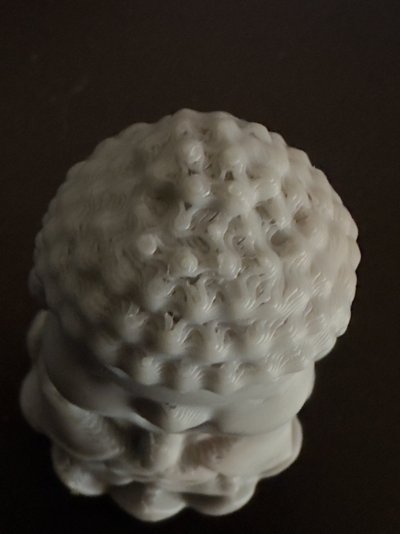
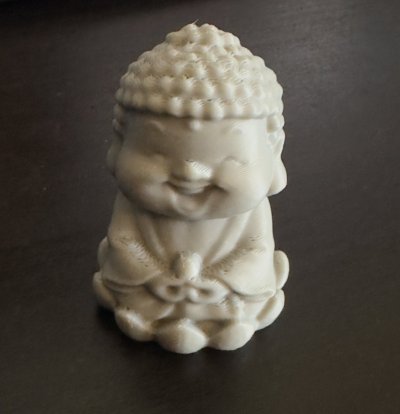
I setup the CC2 yesterday and did my first test print. Was almost perfect. The Printed figure had some imperfections on the top of the figures head, but I figure maybe my print speed was too high. I just used the built in "Buddha" file to run a test. Any advice from you vets. My daughter still loved it and wanted to keep it. Let the fun begin!!!
 

Attachments

  • IMG_4761.jpeg
    IMG_4761.jpeg
    137.1 KB · Views: 0
  • IMG_4763.jpeg
    IMG_4763.jpeg
    168.5 KB · Views: 0
OP
OP
Covert Rain

Covert Rain

Father smelt of elderberries!
Supporting Member
Joined
Jan 27, 2005
Posts
41,584
Reaction score
22,405
Location
Arizona
Update. I figured out the problem above. I didn't calibrate. The Elegoo CC2 has worked flawlessly. One thing I learned is that if you change the filament type you have to re-calibrate. Although with mine, not sure what I do if I have all 4 reels installed and I am mix and matching different filament types depending on which part I am printing.

So much to learn about this stuff. My daughter just finished her first custom 3D model. Going to do a test print today.
 

Devilmaycare

King of Technicalities
Administrator
Super Moderator
Moderator
Joined
Jan 5, 2019
Posts
10,635
Reaction score
17,696
Location
Scottsdale
Update. I figured out the problem above. I didn't calibrate. The Elegoo CC2 has worked flawlessly. One thing I learned is that if you change the filament type you have to re-calibrate. Although with mine, not sure what I do if I have all 4 reels installed and I am mix and matching different filament types depending on which part I am printing.

So much to learn about this stuff. My daughter just finished her first custom 3D model. Going to do a test print today.
yeah, you need to calibrate for each brand/material type combo to an extent. Some are close enough or use the same manufacturer that you can get away with shared profiles. Like Sunlu and Bambu are pretty much the same thing.

I want to check you one thing though. What do you mean by: "mix and matching different filament types"? Do you just mean printing some with red PLA while other parts are white PLA or something else? I'm hoping that's what you mean and not something that's going to cause some issues for you.
 
OP
OP
Covert Rain

Covert Rain

Father smelt of elderberries!
Supporting Member
Joined
Jan 27, 2005
Posts
41,584
Reaction score
22,405
Location
Arizona
yeah, you need to calibrate for each brand/material type combo to an extent. Some are close enough or use the same manufacturer that you can get away with shared profiles. Like Sunlu and Bambu are pretty much the same thing.

I want to check you one thing though. What do you mean by: "mix and matching different filament types"? Do you just mean printing some with red PLA while other parts are white PLA or something else? I'm hoping that's what you mean and not something that's going to cause some issues for you.
Yeah sorry, I mean I calibrate for the "type" even if using multiple colors. I have heard people say they have been able to say print the base in one type and the figure for example in another. Not sure how they do this since depending on the type, the calibration would be different.

I have not come across this scenario so I wouldn't even know how to do it without causing issues.
 

Devilmaycare

King of Technicalities
Administrator
Super Moderator
Moderator
Joined
Jan 5, 2019
Posts
10,635
Reaction score
17,696
Location
Scottsdale
Yeah sorry, I mean I calibrate for the "type" even if using multiple colors. I have heard people say they have been able to say print the base in one type and the figure for example in another. Not sure how they do this since depending on the type, the calibration would be different.

I have not come across this scenario so I wouldn't even know how to do it without causing issues.
Depending on your slicer you should be able to set which filament is using for each part and it'll use the correct profile for what's selected. In Bambu studio here I have green set to use Bambu's PETG and the black printing with Sunlu's PETG. There's a calibration profile for each that sets the flow and other variables. When it gets sliced the generated gcode has commands in it that switches those values around in the printer on the color change.
You must be registered for see images attach


I'm still not clear though on what you mean by "type". When I see type I'm thinking material type: PLA, PETG, ASA, ABS, etc. Not different brands or colors. You have to watch out with mixing material types since some will not bond to each other. Like one trick is that PLA and PETG don't bond well to each other so when you add supports to a print you use the opposite on a the interface layer on the supports. Then the supports break off easier and cleaner.
 
OP
OP
Covert Rain

Covert Rain

Father smelt of elderberries!
Supporting Member
Joined
Jan 27, 2005
Posts
41,584
Reaction score
22,405
Location
Arizona
Depending on your slicer you should be able to set which filament is using for each part and it'll use the correct profile for what's selected. In Bambu studio here I have green set to use Bambu's PETG and the black printing with Sunlu's PETG. There's a calibration profile for each that sets the flow and other variables. When it gets sliced the generated gcode has commands in it that switches those values around in the printer on the color change.
You must be registered for see images attach


I'm still not clear though on what you mean by "type". When I see type I'm thinking material type: PLA, PETG, ASA, ABS, etc. Not different brands or colors. You have to watch out with mixing material types since some will not bond to each other. Like one trick is that PLA and PETG don't bond well to each other so when you add supports to a print you use the opposite on a the interface layer on the supports. Then the supports break off easier and cleaner.
Yeah, I am referencing material mixing (i.e. PLA vs PETG). I have heard as well it's not a good idea to mix. Yet, I have seen people say they have done it with no issues. I have heard others say on multi-color to make sure you are using the same materials for all filaments. I accidentally printed a test tool scraper (mixing PLA and PLA-CF) and it came out perfect. Then thought later I probably should not have done that.

I know each brand has a profile and maybe that doesn't matter. I am not even sure how to calibrate on my printer for using multiple material types all at once if I wanted to or does it simply rely on the profiles. One person told me I have to re-calibrate with each filament type. However, how would I do that if I mixed "types". However, keep reading conflicting recommendations.

All stuff I am trying to learn.
 

dreamcastrocks

Chopped Liver Moderator
Super Moderator
Moderator
Supporting Member
Joined
Aug 19, 2005
Posts
47,296
Reaction score
13,959
Yeah sorry, I mean I calibrate for the "type" even if using multiple colors. I have heard people say they have been able to say print the base in one type and the figure for example in another. Not sure how they do this since depending on the type, the calibration would be different.

I have not come across this scenario so I wouldn't even know how to do it without causing issues.
It is possible. Some people print them separately and then make them interlock etc. (but then if it is separate, you can print them in different plates or whatever)

Typically you're right though. PLA and PETG for example don't really adhere together well. People have also glued parts together.
 
Last edited:

Devilmaycare

King of Technicalities
Administrator
Super Moderator
Moderator
Joined
Jan 5, 2019
Posts
10,635
Reaction score
17,696
Location
Scottsdale
Yeah, I am referencing material mixing (i.e. PLA vs PETG). I have heard as well it's not a good idea to mix. Yet, I have seen people say they have done it with no issues. I have heard others say on multi-color to make sure you are using the same materials for all filaments. I accidentally printed a test tool scraper (mixing PLA and PLA-CF) and it came out perfect. Then thought later I probably should not have done that.

I know each brand has a profile and maybe that doesn't matter. I am not even sure how to calibrate on my printer for using multiple material types all at once if I wanted to or does it simply rely on the profiles. One person told me I have to re-calibrate with each filament type. However, how would I do that if I mixed "types". However, keep reading conflicting recommendations.

All stuff I am trying to learn.
Generally you should stick to the same type of material or ones that are known to work together. PLA and PLA-CF are basically the same thing (for this discussion) so that one working isn't a surprise. Mix PLA and PETG through and you're going to have a bad time keeping it together. The opposite one is used for as the interface layer on supports for a reason.

For calibration you should have a profile for each material type for each brand. I stick to a couple brands that I know print well to keep that easy.

As for how to calibrate, that depends on the slicer you're using. I'm using Bambu Studio and it has a calibration tab with options to do the flow dynamics and rates. Basically it prints some test patterns and you tell it which is best from each one. It then generates the profile that you can in future prints when you're slicing a model.

As for calibrating when mixing types, I feel like there's a misunderstanding here. It's not something you do directly. You have a profile for Type A and a profile for Type B. Then say you set in you have 4mm cube for a model (keeping it simple here ;)) and set the bottom 2mm to Type A and the top 2mm to TypeB in the slicer. When you slice it, the slicer will create the gcode appropriately for each part. It'll cause the printer do something like print A at a max volumetric speed of 14 mm^3/s and then switch that to 16 mm^3/s when it starts printing B. There's no combined profile. It uses each individual one when appropriate.

 
OP
OP
Covert Rain

Covert Rain

Father smelt of elderberries!
Supporting Member
Joined
Jan 27, 2005
Posts
41,584
Reaction score
22,405
Location
Arizona
Generally you should stick to the same type of material or ones that are known to work together. PLA and PLA-CF are basically the same thing (for this discussion) so that one working isn't a surprise. Mix PLA and PETG through and you're going to have a bad time keeping it together. The opposite one is used for as the interface layer on supports for a reason.

For calibration you should have a profile for each material type for each brand. I stick to a couple brands that I know print well to keep that easy.

As for how to calibrate, that depends on the slicer you're using. I'm using Bambu Studio and it has a calibration tab with options to do the flow dynamics and rates. Basically it prints some test patterns and you tell it which is best from each one. It then generates the profile that you can in future prints when you're slicing a model.

As for calibrating when mixing types, I feel like there's a misunderstanding here. It's not something you do directly. You have a profile for Type A and a profile for Type B. Then say you set in you have 4mm cube for a model (keeping it simple here ;)) and set the bottom 2mm to Type A and the top 2mm to TypeB in the slicer. When you slice it, the slicer will create the gcode appropriately for each part. It'll cause the printer do something like print A at a max volumetric speed of 14 mm^3/s and then switch that to 16 mm^3/s when it starts printing B. There's no combined profile. It uses each individual one when appropriate.

My slicer is a flavor of Orca. It's Elegoo's version but I can use either. I wish there was a comprehensive guide out there. I have read some good information, but it's all scattered. On my CC2, it has you select the profile based on the brand, then runs a calibration for that filament profile, adjusting the bed etc. I have also run one of those tests files to check everything a couple times and the prints came out perfect. So, I didn't have to adjust anything my last several prints.

I was just a tad confused because people keep saying that you can mix and match filaments, but what you said makes much more sense. I will definitly not mix PLA with PETG. Luckily, I bought a good mix of colors for my sets of PLA and PETG. I am too scared to try any of the other types yet. LOL.

Also, do you recommend a dryer? Another thing I have heard different opinions. Some people say they never use a dryer and have had no problems. Other say, if they don't dry their filament they do have problems. Any advice?
 

Devilmaycare

King of Technicalities
Administrator
Super Moderator
Moderator
Joined
Jan 5, 2019
Posts
10,635
Reaction score
17,696
Location
Scottsdale
My slicer is a flavor of Orca. It's Elegoo's version but I can use either. I wish there was a comprehensive guide out there. I have read some good information, but it's all scattered. On my CC2, it has you select the profile based on the brand, then runs a calibration for that filament profile, adjusting the bed etc. I have also run one of those tests files to check everything a couple times and the prints came out perfect. So, I didn't have to adjust anything my last several prints.

I was just a tad confused because people keep saying that you can mix and match filaments, but what you said makes much more sense. I will definitly not mix PLA with PETG. Luckily, I bought a good mix of colors for my sets of PLA and PETG. I am too scared to try any of the other types yet. LOL.

Also, do you recommend a dryer? Another thing I have heard different opinions. Some people say they never use a dryer and have had no problems. Other say, if they don't dry their filament they do have problems. Any advice?
Orca is a fork of Bambu Studio so there should be a lot of similarities there. When you're looking for info try searching on it too.

People say a lot of incorrect things on the internet. You should know that since you're in P&R regularly. ;) I think what you run into a lot is people mixing up terminology and what they mean. That's why I was trying to nail down what you meant by "type" earlier. You're ok to mix filaments when it comes to different brands or different colors of the same type. Or really type family like your example earlier of PLA and PLA-CF. They're both the same type of plastic, on just has CF added to it, so they'll bond together ok. It's when you're mixing different types that you have to watch out.

I'd recommend trying to stay homogenous when it comes to types for a single print. Less headaches. Some don't bond well like PLA and PETG. Some do bond well like PLA and ABS but then you run into other issues like the heat differences. ABS needs a much warmer bed and head temp than PLA. So the printer has to heat up or cool down when switching and then the temp differences can cause melting, warping, and other issues. It's generally easier to print separately and then glue together.

Drying is mixed. Luckily we're in AZ with no humidity so generally the answer is no. Other parts of the country you need to be drying everything. That said there's some filament that you do need to dry before use. TPU usually needs to be dried before the first use to get it to print well. Then some thing like translucent PETG will print clearer if you dry it first. So there's those edge cases. I use a dehydrator with some custom printed walls to do it over one of the dryers that you can buy. Those sucked when I started and the DIY was better. I haven't really kept up with them to know how well the newer ones work.

I do keep all my filament in boxes though with desiccant and humidity gauges though and try to keep them under 20%. I used to not do this and had a bunch of rolls go bad on me over time. They get brittle and break. It's usually the odd ball colors that I only print once in a while. Something like black PLA I run through so quickly that it doesn't have time to absorb here. I can post pictures and what I do for storage tomorrow if you want to look into it.
 
OP
OP
Covert Rain

Covert Rain

Father smelt of elderberries!
Supporting Member
Joined
Jan 27, 2005
Posts
41,584
Reaction score
22,405
Location
Arizona
You all should have warned me. I am obsessed with trying out new prints now. Just ordered more filament. I am having so much fun with this damn thing.
 

dreamcastrocks

Chopped Liver Moderator
Super Moderator
Moderator
Supporting Member
Joined
Aug 19, 2005
Posts
47,296
Reaction score
13,959
You all should have warned me. I am obsessed with trying out new prints now. Just ordered more filament. I am having so much fun with this damn thing.
Yeah, it's pretty crazy. I have over 50 rolls of filament at the moment...
 
OP
OP
Covert Rain

Covert Rain

Father smelt of elderberries!
Supporting Member
Joined
Jan 27, 2005
Posts
41,584
Reaction score
22,405
Location
Arizona
Yeah, it's pretty crazy. I have over 50 rolls of filament at the moment...
I just ordered TPU. I want to try more "squishable" type prints just to experiment. I have all these ideas my wife is thrilled about. ;) For starters I am printing this Star Wars dual switch light plate. Then I have some mounts for some memorabilia I am printing. All for my dedicated HT room.
 

Devilmaycare

King of Technicalities
Administrator
Super Moderator
Moderator
Joined
Jan 5, 2019
Posts
10,635
Reaction score
17,696
Location
Scottsdale
I just ordered TPU. I want to try more "squishable" type prints just to experiment. I have all these ideas my wife is thrilled about. ;) For starters I am printing this Star Wars dual switch light plate. Then I have some mounts for some memorabilia I am printing. All for my dedicated HT room.
TPU I'd recommend drying before use. Also double check with your printer's feed system if you have to handle it differently. Like with mine I can't run it through my AMS, I have to direct feed it. The material is too soft for some of the feed gears inside the AMS.
 
Top